Tutorial: Notes app
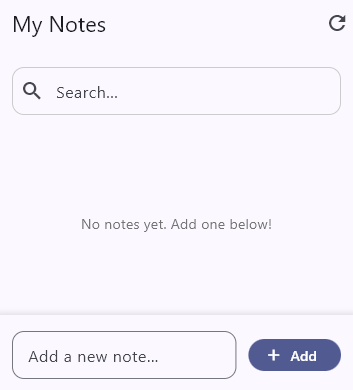
Let’s build a Notes app that:
- Loads notes from a server (with retry if it fails)
- Adds, deletes and searches notes
- Shows loading spinners and error messages
Here are the features of bloc_superpowers that we will use:
| Feature | What It Does | How |
|---|---|---|
mix(key: ...) | Gives superpowers to the Cubits | Wraps the Cubit method code |
context.isWaiting(key) | Show spinners and disable buttons while loading | Returns true while running |
context.isFailed(key) | Show error messages when something fails | Returns true if failed |
context.getException(key) | Get the error message to display | Gets the error message |
UserException | Allows writing user-friendly error messages | Throw this from your Cubit methods |
UserExceptionDialog | Show error dialog automatically | Wraps the widget tree |
retry | Retries failed requests | Is a mix() function parameter |
fresh | Skips loading if data is still fresh | Is a mix() function parameter |
nonReentrant | Prevents double-tap | Is a mix() function parameter |
debounce | Waits for typing to stop | Is a mix() function parameter |
Effect | Sends one-time signal from Cubit to UI | Add effects to your Cubit state |
context.effect() | Clears the textfield in the UI | Returns the effect value only once |
Step 1: Setup
Section titled “Step 1: Setup”First, add bloc_superpowers to your pubspec.yaml:
dependencies: bloc_superpowers: ^1.0.0 flutter_bloc: ^9.1.1 fast_immutable_collections: ^11.1.0 # Allow us to use IList (immutable List)Run flutter pub get
Step 2: Create the Note Model
Section titled “Step 2: Create the Note Model”We need a simple class to hold note data:
class Note {  final String id;  final String text;  final DateTime createdAt;
  Note({required this.id, required this.text, required this.createdAt});}
This is just a normal class. Nothing special here.
Step 3: Create the State
Section titled “Step 3: Create the State”Our state holds the list of notes, the search query, and an Effect:
class NotesState {  final IList<Note> notes;  final String searchQuery;  final Effect clearInputEffect;
  NotesState({    Iterable<Note>? notes,    this.searchQuery = '',    Effect? clearInputEffect,  })  : notes = IList.orNull(notes) ?? const IList.empty(),        clearInputEffect = clearInputEffect ?? Effect.spent();
  bool get isEmpty => notes.isEmpty;
  NotesState copyWith({ ... });
  /// Returns a new state without the note with the given id.  NotesState removeNote(String id) =>      copyWith(notes: notes.where((n) => n.id != id).toIList());
  /// Returns notes filtered by the search query.  IList<Note> get filteredNotes {    if (searchQuery.isEmpty) return notes;    final query = searchQuery.toLowerCase();    return notes.where((n) => n.text.toLowerCase().contains(query)).toIList();  }}
Key points:
-
The notes list is of type
IList, an immutable list from thefast_immutable_collectionspackage. Using it is optional, and we could have declared it asList<Note> notes. -
The
clearInputEffectis a one-time signal that orders the UI to clear the text field. It starts asEffect.spent()(meaning “no signal yet”). More on that later. -
removeNoteis a helper method that encapsulates state changes. -
filteredNotesreturns notes that match the search query.
Step 4: Create the Cubit
Section titled “Step 4: Create the Cubit”Now the fun part! We create a Cubit with superpowers.
The mix() Function
Section titled “The mix() Function”The mix() function wraps your async code and gives it superpowers. The basic format is:
mix( key: someKey, () async { // Your code here },);The key is very important. It tells the system which operation is running. You can use:
key: thismeans the key is the Cubit type- A string like
key: 'addNote'to identify specific operations - A tuple like
key: ('deleteNote', noteId)for operations on specific items
Load Notes with retry and fresh
Section titled “Load Notes with retry and fresh”class NotesCubit extends Cubit<NotesState> { NotesCubit() : super(NotesState());
void loadNotes({bool force = false}) { mix( key: this, fresh: fresh(ignoreFresh: force), retry: retry, () async { final notes = await api.fetchNotes(); emit(state.copyWith(notes: notes.toIList())); }, ); }}Let’s break this down:
key: this
- Uses
NotesCubitas the key - Later,
context.isWaiting(NotesCubit)will returntruewhile loading
fresh: fresh(ignoreFresh: force)
- If
loadNotes()ran recently, skip it - The data is still “fresh”, no need to reload
- Pass
force: trueto bypass freshness check (like pull-to-refresh)
retry: retry
- If the request fails, try again up to 3 more times
- Wait 350ms before the first retry, then 700ms, then 1400ms
- This is called “exponential backoff”
Note the API call in await api.fetchNotes() was set up to fail to demonstrate retries.
It will fail on the 3rd, 5th, 6th, 7th, and 8th fetches.
You can’t see the 3rd failure because it retries automatically and succeeds on the 4th attempt.
However, the 5th attempt will keep retrying until it finally fails and shows an error. Try it!
Add Note with nonReentrant and UserException
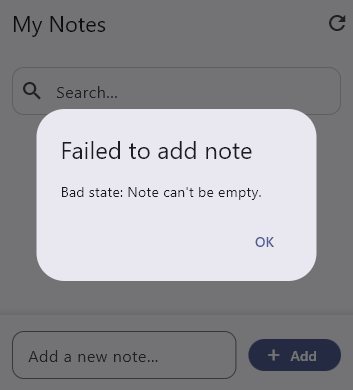
Section titled “Add Note with nonReentrant and UserException”void addNote(String text) { mix( key: 'addNote', nonReentrant: nonReentrant, catchError: (error, stack) { throw UserException('Failed to add note').addReason(error.toString()); }, () async { // Validate input - the error will be caught by catchError above. if (text.trim().isEmpty) throw StateError("Note can't be empty.");
final newNote = await api.saveNote(text);
emit(state.copyWith( notes: state.notes.add(newNote), clearInputEffect: Effect(), )); }, );}key: 'addNote'
- Uses the string
'addNote'as the key context.isWaiting('addNote')will returntruewhile adding
nonReentrant: nonReentrant
- If the user taps “Add” twice fast, only the first tap runs
- The second tap is ignored (no error, just skipped)
- This prevents creating duplicate notes
clearInputEffect: Effect()
- Send a signal to the UI: “clear the text field”
- The UI will read this once, then it becomes “spent”
throw StateError("Note can't be empty.")
- Validate input and throw if invalid
- The
catchErrorhandler wraps this in aUserException
catchError
- If any error happens, wrap it in a
UserException - The
UserExceptionDialogwill show this message to the user
Note that throwing a StateError and then catching it to convert to a UserException
in a catchError block is just to demonstrate the feature.
We could have directly thrown a UserException instead:
if (text.trim().isEmpty) throw UserException("Note can't be empty.");
Search with debounce
Section titled “Search with debounce”void search(String query) { mix( key: 'search', debounce: debounce, () async { emit(state.copyWith(searchQuery: query)); }, );}debounce: debounce
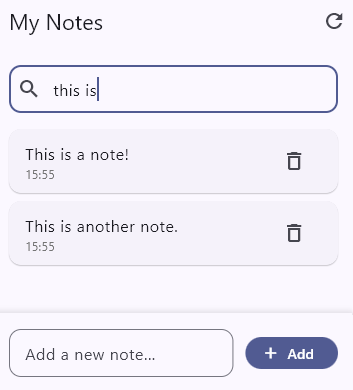
- If the user types “hello” fast, we don’t want 5 searches (h, he, hel, hell, hello)
- Debounce waits until the user stops typing for 300ms
- Then it runs only once with the final value “hello”
Delete Note
Section titled “Delete Note”void removeNote(String noteId) { mix( key: ('deleteNote', noteId), () async { await api.deleteNote(noteId);
// This demonstrates encapsulating state // changes in the state class itself. emit(state.removeNote(noteId)); }, );}key: ('deleteNote', noteId)
- Uses a tuple as the key
- Each note has its own key
context.isWaiting(('deleteNote', 'note_1'))checks if note_1 is being deleted
Step 5: Build the App
Section titled “Step 5: Build the App”Wrap your app with Superpowers and UserExceptionDialog:
class NotesApp extends StatelessWidget {  const NotesApp({super.key});
  @override  Widget build(BuildContext context) {    return Superpowers(      child: BlocProvider(        create: (_) => NotesCubit()..loadNotes(),        child: MaterialApp(          title: 'Notes Tutorial',          home: UserExceptionDialog(            child: const NotesScreen(),          ),        ),      ),    );  }}
Superpowers
- Put this near the top of your widget tree
- It makes
context.isWaiting()andcontext.isFailed()work
UserExceptionDialog
- Shows an error dialog when a
UserExceptionis thrown - Put it right below
MaterialApp - You don’t need to do anything else - errors show automatically
Step 6: Show Loading States
Section titled “Step 6: Show Loading States”Use context.isWaiting() to check if an operation is running:
class RefreshButton extends StatelessWidget {  @override  Widget build(BuildContext context) {    final isLoading = context.isWaiting(NotesCubit);
    return isLoading        ? CircularProgressIndicator()        : IconButton(            icon: Icon(Icons.refresh),            onPressed: () => context.read<NotesCubit>().loadNotes(force: true),          );  }}
The key passed to isWaiting() must match the key used in mix():
context.isWaiting(NotesCubit)- matcheskey: thisin NotesCubitcontext.isWaiting('addNote')- matcheskey: 'addNote'context.isWaiting(('deleteNote', noteId))- matcheskey: ('deleteNote', noteId)
The widget rebuilds automatically when the loading state changes.
Step 7: Show Error States
Section titled “Step 7: Show Error States”Use context.isFailed() and context.getException():
class ErrorMessage extends StatelessWidget {  @override  Widget build(BuildContext context) {
    final errorMessage = context.getException(NotesCubit)!.message;
    return Container(      padding: EdgeInsets.all(12),      color: Colors.red.shade50,      child: Row(        children: [          Icon(Icons.error, color: Colors.red),          SizedBox(width: 8),          Text(errorMessage),          TextButton(            onPressed: () => context.read<NotesCubit>().loadNotes(force: true),            child: Text('Retry'),          ),        ],      ),    );  }}
context.getException(NotesCubit)!.message
- Returns the UserException that was thrown
- Since the widget is only shown when
isFailedis true, we can safely use! - Use
.messageto get the error message
The error state clears automatically when you call the method again.
Step 8: Use Effect
Section titled “Step 8: Use Effect”An Effect is a one-time signal from your Cubit to your UI. For example:
- “Clear the text field”
- “Show a snackbar”
- “Navigate to another screen”
Once the UI reads the Effect, it becomes “spent” and won’t trigger again.
Use context.effect() to consume one-time signals:
class AddNoteInput extends StatefulWidget {  @override  State<AddNoteInput> createState() => _AddNoteInputState();}
class _AddNoteInputState extends State<AddNoteInput> {  final _controller = TextEditingController();
  @override  Widget build(BuildContext context) {    // Consume the effect    final shouldClear = context.effect((NotesCubit c) => c.state.clearInputEffect);    if (shouldClear == true) _controller.clear();
    return TextField(      controller: _controller,      decoration: InputDecoration(hintText: 'Add a note...'),      onSubmitted: (text) => context.read<NotesCubit>().addNote(text),    );  }}
context.effect((NotesCubit c) => c.state.clearInputEffect)
- Returns
trueif the effect was just triggered - Returns
falseif the effect is “spent” (already consumed) - The effect is consumed when you read it
In the Cubit, trigger the effect with:
emit(state.copyWith(clearInputEffect: Effect()));The final code
Section titled “The final code”import 'package:bloc_kiss/bloc_kiss.dart';import 'package:fast_immutable_collections/fast_immutable_collections.dart';import 'package:flutter/material.dart';import 'package:flutter_bloc/flutter_bloc.dart';
void main() { runApp(const NotesApp());}
// =============================================================================// MODEL// =============================================================================
class Note { final String id; final String text; final DateTime createdAt;
Note({required this.id, required this.text, required this.createdAt});}
// =============================================================================// STATE// =============================================================================
@immutableclass NotesState { final IList<Note> notes; final String searchQuery;
// Demonstrates Effect: a one-time notification to clear the text field. final Effect clearInputEffect;
NotesState({ Iterable<Note>? notes, this.searchQuery = '', Effect? clearInputEffect, }) : notes = IList.orNull(notes) ?? const IList.empty(), clearInputEffect = clearInputEffect ?? Effect.spent();
bool get isEmpty => notes.isEmpty;
NotesState copyWith({ Iterable<Note>? notes, String? searchQuery, Effect? clearInputEffect, }) => NotesState( notes: IList(notes ?? this.notes), searchQuery: searchQuery ?? this.searchQuery, clearInputEffect: clearInputEffect ?? this.clearInputEffect, );
/// Returns a new state without the note with the given id. NotesState removeNote(String id) => copyWith(notes: notes.where((n) => n.id != id));
/// Returns notes filtered by the search query. IList<Note> get filteredNotes { if (searchQuery.isEmpty) return notes; final query = searchQuery.toLowerCase(); return notes.where((n) => n.text.toLowerCase().contains(query)).toIList(); }
@override bool operator ==(Object other) => identical(this, other) || other is NotesState && notes == other.notes && searchQuery == other.searchQuery && clearInputEffect == other.clearInputEffect;
@override int get hashCode => notes.hashCode ^ searchQuery.hashCode ^ clearInputEffect.hashCode;}
// =============================================================================// CUBIT// =============================================================================
class NotesCubit extends Cubit<NotesState> { NotesCubit() : super(NotesState());
/// Loads notes from the "server". void loadNotes({bool force = false}) { mix( // Demonstrates mix() with key. // Using `this` means the key is the Cubit's runtimeType (NotesCubit). // This key is used by context.isWaiting() and context.isFailed(). key: this,
// Demonstrates fresh: prevents reloading data that's still valid. // If loadNotes() was called successfully recently, skip it. // Use force: true to bypass this (e.g., pull-to-refresh). fresh: fresh(ignoreFresh: force),
// Demonstrates retry: automatic retry with exponential backoff. retry: retry,
() async { // This API request will fail from time to time to demonstrate retry: // It will fail on fetches 3, 5, 6, 7, and 8. final notes = await api.fetchNotes();
emit(state.copyWith(notes: notes)); }, ); }
/// Adds a new note. void addNote(String text) { mix( key: 'addNote',
// Demonstrates nonReentrant: if the user taps "Add" twice quickly, // only the first tap executes. The second is silently ignored. nonReentrant: nonReentrant,
// Demonstrates catchError: transform any error into a UserException. // The UserExceptionDialog will show this message to the user. catchError: (error, stack) { throw UserException('Failed to add note').addReason(error.toString()); },
() async { // Demonstrates UserException: validate input and throw if invalid. if (text.trim().isEmpty) throw StateError("Note can't be empty.");
final newNote = await api.saveNote(text);
emit(state.copyWith( notes: state.notes.add(newNote),
// Demonstrates Effect: signal the UI to clear the text field. // The Effect is consumed once by the widget, then becomes "spent". clearInputEffect: Effect(), )); }, ); }
/// Removes a note. void removeNote(String noteId) { mix( key: ('deleteNote', noteId), () async { await api.deleteNote(noteId);
// Demonstrates encapsulating state // changes in the state class itself. emit(state.removeNote(noteId)); }, ); }
/// Searches notes by query. void search(String query) { mix( key: 'search',
// Demonstrates debounce: if the user types "hello" quickly, // instead of 5 searches (h, he, hel, hell, hello), only 1 search // runs after they stop typing for 300ms. debounce: debounce,
() async { emit(state.copyWith(searchQuery: query)); }, ); }}
// =============================================================================// APP// =============================================================================
class NotesApp extends StatelessWidget { const NotesApp({super.key});
@override Widget build(BuildContext context) { return Superpowers( child: BlocProvider( create: (_) => NotesCubit()..loadNotes(), child: MaterialApp( title: 'Notes Tutorial', debugShowCheckedModeBanner: false, theme: ThemeData(colorScheme: ColorScheme.fromSeed(seedColor: Colors.indigo), useMaterial3: true),
// Demonstrates UserExceptionDialog: automatically shows an // error dialog whenever a mix() call throws a UserException. home: UserExceptionDialog( child: const NotesScreen(), ), ), ), ); }}
// =============================================================================// SCREEN// =============================================================================
class NotesScreen extends StatelessWidget { const NotesScreen({super.key});
@override Widget build(BuildContext context) { // Demonstrates context.isFailed(): returns true if loadNotes() failed. final loadFailed = context.isFailed(NotesCubit);
return Scaffold( appBar: AppBar( title: const Text('My Notes'), actions: [RefreshButtonWithLoadingIndicator()], ), body: Column( children: [ SearchBar(), if (loadFailed) ErrorMessage(), NotesList(), AddNoteInput(), ], ), ); }}
class AddNoteInput extends StatefulWidget { const AddNoteInput({super.key});
@override State<AddNoteInput> createState() => _AddNoteInputState();}
class _AddNoteInputState extends State<AddNoteInput> { final _controller = TextEditingController();
static const inputDecoration = InputDecoration( hintText: 'Add a new note...', border: OutlineInputBorder(borderRadius: BorderRadius.all(Radius.circular(12))), );
static List<BoxShadow>? boxShadow = [ BoxShadow(color: Colors.black.withValues(alpha: 0.1), blurRadius: 4, offset: const Offset(0, -2)), ];
@override void dispose() { _controller.dispose(); super.dispose(); }
@override Widget build(BuildContext context) { // Demonstrates Effect: consume the clearInputEffect. // Returns true if the effect was just dispatched, false if already spent. final clear = context.effect((NotesCubit c) => c.state.clearInputEffect); if (clear == true) _controller.clear();
// Demonstrates context.isWaiting() with a different key. final isAddingNote = context.isWaiting('addNote');
return Container( padding: const EdgeInsets.all(16), decoration: BoxDecoration(color: Theme.of(context).colorScheme.surface, boxShadow: boxShadow), child: Row( children: [ Expanded( child: TextField( controller: _controller, decoration: inputDecoration, onSubmitted: isAddingNote ? null : (text) => context.read<NotesCubit>().addNote(text), ), ), const SizedBox(width: 12), FilledButton.icon( // Disable button while adding (nonReentrant handles this too, // but disabling gives better UX feedback). onPressed: isAddingNote ? null : () => context.read<NotesCubit>().addNote(_controller.text), icon: isAddingNote ? const SizedBox( width: 16, height: 16, child: CircularProgressIndicator(strokeWidth: 2, color: Colors.white), ) : const Icon(Icons.add), label: const Text('Add'), ), ], ), ); }}
class RefreshButtonWithLoadingIndicator extends StatelessWidget { const RefreshButtonWithLoadingIndicator({super.key});
@override Widget build(BuildContext context) { // Demonstrates context.isWaiting(): returns true while loadNotes() // is running. The widget rebuilds automatically when this changes. final isLoadingNotes = context.isWaiting(NotesCubit);
return isLoadingNotes ? const Padding( padding: EdgeInsets.all(16), child: SizedBox(width: 20, height: 20, child: CircularProgressIndicator(strokeWidth: 2)), ) : IconButton( icon: const Icon(Icons.refresh), // Force reload bypasses the `fresh` check. onPressed: () => context.read<NotesCubit>().loadNotes(force: true), ); }}
class ErrorMessage extends StatelessWidget { const ErrorMessage({super.key});
@override Widget build(BuildContext context) { // Demonstrates context.getException() to get the error message. final errorMessage = context.getException(NotesCubit)!.message;
return Container( margin: const EdgeInsets.symmetric(horizontal: 16), padding: const EdgeInsets.all(12), decoration: BoxDecoration(color: Colors.red.shade50, borderRadius: BorderRadius.circular(8)), child: Row( children: [ const Icon(Icons.error_outline, color: Colors.red), const SizedBox(width: 8), Expanded( child: Text(errorMessage, style: const TextStyle(color: Colors.red)), ), TextButton( onPressed: () => context.read<NotesCubit>().loadNotes(force: true), child: const Text('Retry'), ), ], ), ); }}
// Search bar - demonstrates debounce.class SearchBar extends StatelessWidget { const SearchBar({super.key});
static const searchDecoration = InputDecoration( hintText: 'Search...', prefixIcon: Icon(Icons.search), enabledBorder: OutlineInputBorder(borderSide: BorderSide(color: Color(0xFFCCCCCC)), borderRadius: BorderRadius.all(Radius.circular(12))), border: OutlineInputBorder(borderRadius: BorderRadius.all(Radius.circular(12))), );
@override Widget build(BuildContext context) { return Padding( padding: const EdgeInsets.all(16), child: TextField( decoration: searchDecoration, // Demonstrates debounce: search is called on every keystroke, // but the actual search only runs after 300ms of inactivity. onChanged: (query) => context.read<NotesCubit>().search(query), ), ); }}
class NotesList extends StatelessWidget { const NotesList({super.key});
@override Widget build(BuildContext context) {
// Demonstrates context.isWaiting(): returns true while loadNotes() // is running. The widget rebuilds automatically when this changes. final isLoadingNotes = context.isWaiting(NotesCubit);
final isEmpty = context.select((NotesCubit c) => c.state.isEmpty);
final filteredNotes = context.select((NotesCubit c) => c.state.filteredNotes);
final searchQuery = context.select((NotesCubit c) => c.state.searchQuery);
return Expanded( child: isLoadingNotes && isEmpty ? const Center(child: CircularProgressIndicator()) : filteredNotes.isEmpty ? Center( child: Text( isEmpty ? 'No notes yet. Add one below!' : 'No notes match "$searchQuery"', style: TextStyle(color: Colors.grey.shade600), ), ) : ListView.builder( padding: const EdgeInsets.symmetric(horizontal: 16), itemCount: filteredNotes.length, itemBuilder: (context, index) => NoteCard(note: filteredNotes[index]), ), ); }}
class NoteCard extends StatelessWidget { final Note note;
const NoteCard({super.key, required this.note});
@override Widget build(BuildContext context) { // Check if this specific note is being deleted. final isDeleting = context.isWaiting(('deleteNote', note.id));
return Card( margin: const EdgeInsets.only(bottom: 8), child: ListTile( title: Text(note.text), subtitle: Text( '${note.createdAt.hour}:${note.createdAt.minute.toString().padLeft(2, '0')}', style: TextStyle(color: Colors.grey.shade600, fontSize: 12), ), trailing: isDeleting ? const SizedBox(width: 24, height: 24, child: CircularProgressIndicator(strokeWidth: 2)) : IconButton( icon: const Icon(Icons.delete_outline), onPressed: () => context.read<NotesCubit>().removeNote(note.id), ), ), ); }}
// =============================================================================// SIMULATED API// =============================================================================
/// Simulated API with artificial delays and occasional failures.final api = _SimulatedApi();
class _SimulatedApi { final List<Note> _notes = []; int _idCounter = 0; int _fetchAttempts = 0;
/// Simulates fetching notes from a server. /// Fails on the first attempt to demonstrate retry. Future<List<Note>> fetchNotes() async { await Future.delayed(const Duration(milliseconds: 800));
_fetchAttempts++;
// Fail to demonstrate retry on fetches 3, 5, 6, 7, and 8. // Fetch 3 will be retried, and will succeed on the 4th attempt. // Fetches 5-8 will be retried 3 times before finally failing. if (_fetchAttempts == 3 || (_fetchAttempts >= 5 && _fetchAttempts <= 8)) { print('Fetch $_fetchAttempts failed.'); throw UserException('Network error'); } else { print('Fetch $_fetchAttempts successful.'); }
return List.unmodifiable(_notes); }
/// Simulates adding a note to the server. Future<Note> saveNote(String text) async { await Future.delayed(const Duration(milliseconds: 500));
final note = Note( id: 'note_${++_idCounter}', text: text.trim(), createdAt: DateTime.now(), ); _notes.insert(0, note); return note; }
/// Simulates deleting a note from the server. Future<void> deleteNote(String id) async { await Future.delayed(const Duration(milliseconds: 300)); _notes.removeWhere((n) => n.id == id); }}